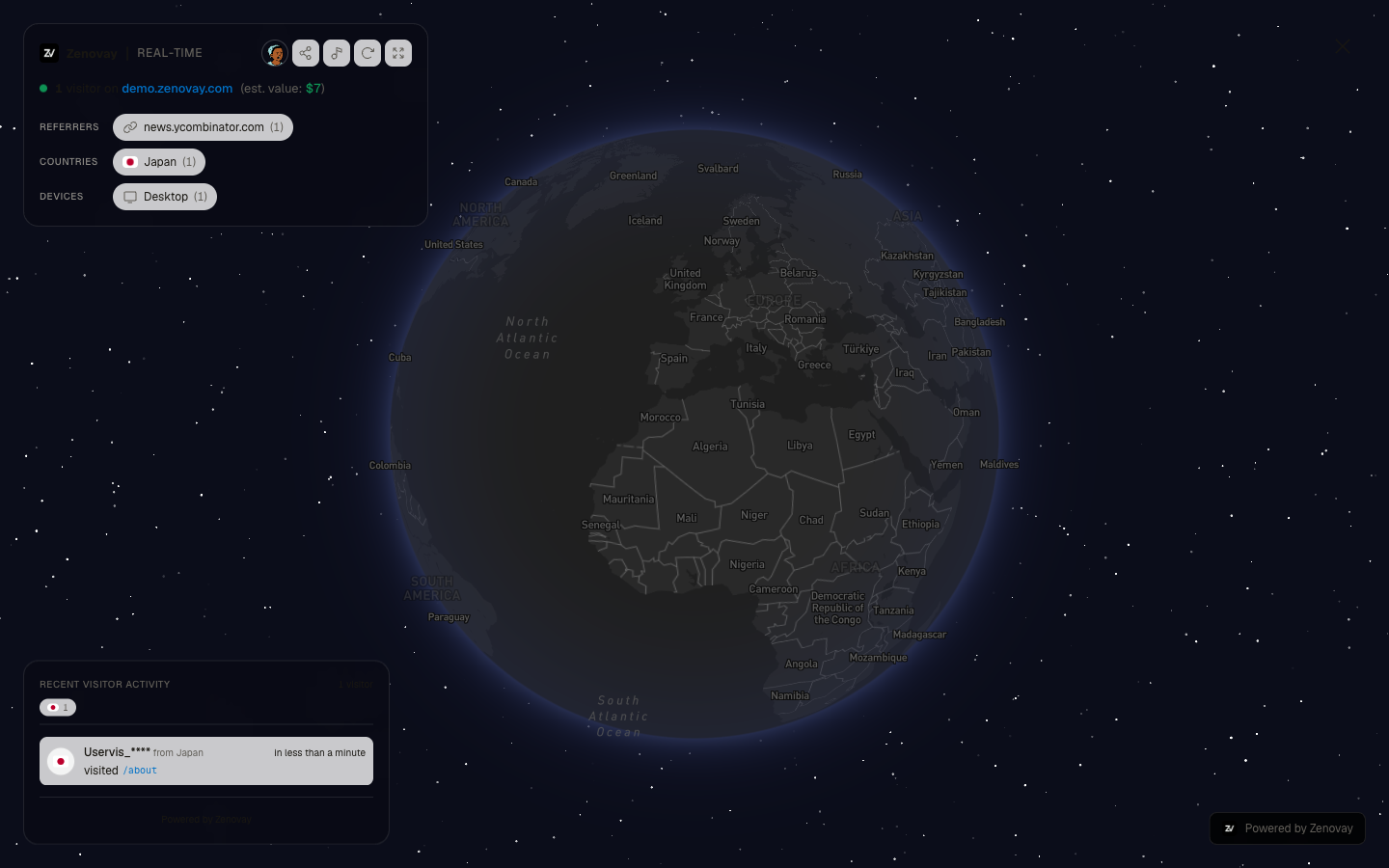
The 3D Globe is Zenovay's signature feature - a stunning real-time visualization that transforms your visitor data into an interactive experience.
What is the 3D Globe?
The 3D Globe displays your website visitors as markers on an interactive Earth visualization:
- Real-time markers: See visitors appear as they land on your site
- Geographic insight: Instantly understand your global reach
- DiceBear avatars: Each visitor gets a unique avatar based on their visitor ID
- Interactive exploration: Rotate, zoom, and click markers for details
Why the 3D Globe Matters
Beyond Charts and Numbers
Traditional analytics show data in tables and charts. The 3D Globe adds a new dimension:
| Traditional View | 3D Globe |
|---|---|
| Numbers and percentages | Visual geographic context |
| Static snapshots | Real-time activity |
| Abstract data | Tangible visitor representation |
| Separate reports | Unified world view |
Use Cases
Presentations & Meetings
- Impress stakeholders with live visualization
- Demonstrate global reach to investors
- Show real-time campaign performance
Team Dashboards
- Office displays showing live activity
- Marketing war rooms
- E-commerce command centers
Personal Motivation
- See the real people visiting your site
- Celebrate reaching new countries
- Watch growth in real-time
Accessing the Globe
From the Dashboard
- Open your Zenovay dashboard
- Open a website's dashboard and select the Globe tab (under the Behavior group in the sidebar)
- The globe loads with your current real-time visitor data
Your First Look
When you first open the Globe, you'll see:
The Earth
A 3D Earth rendered with the Mapbox dark theme:
- Country borders visible
- Dark color scheme optimized for marker visibility
- Smooth rotation and zoom animations
Visitor Markers
DiceBear avatar markers representing visitors:
- Location: Where the visitor is approximately located (based on IP geolocation)
- Size: Scales based on the visitor's value score (higher value = larger marker)
- Avatar: Unique DiceBear Open Peeps avatar generated from the visitor's ID
- Fade-in: New visitors fade in smoothly as they appear
Activity Feed
A panel in the bottom-left corner showing recent activity (desktop only):
- Recent visitors, most recent first
- A country flag and an anonymized visitor ID per entry
- The page each visitor is viewing
- Click any visitor to fly the globe to their location
Live Stats Panel
The panel in the top-left corner shows live statistics:
- Active visitor count (visitors on site right now)
- Top referrers, countries, and devices
- Click any breakdown chip to filter the markers shown on the globe
Globe Controls
The action buttons live in the header of the top-left live stats panel:
| Control | Action |
|---|---|
| Share | Enable sharing and copy the public globe link |
| Music | Toggle ambient background music |
| Auto-rotate | Toggle automatic globe rotation |
| Fullscreen | Toggle fullscreen mode |
The Share button only appears in your own dashboard, not on a public share link.
Globe Navigation Basics
Mouse Controls
| Action | Control |
|---|---|
| Rotate | Click and drag |
| Zoom | Scroll wheel |
| Select marker | Click on a visitor marker |
Touch Controls
On touch devices:
- Rotate: One finger drag
- Zoom: Pinch gesture
- Select: Tap a marker
Understanding Visitor Markers
Marker Appearance
Each marker represents a visitor:
- Position: Approximate location based on IP geolocation, with city-level geocoding when available
- DiceBear avatar: Unique avatar that stays consistent for the same visitor
- Size variation: High-value visitors (score 80+) get larger markers and may have avatar accessories
Location Accuracy
IP-based geolocation is accurate to city level but not exact addresses. This is normal and protects visitor privacy.
If a visitor's coordinates appear unreliable (more than 6,000 km from the country center), the globe falls back to country-center coordinates and attempts city-level geocoding via the Mapbox API.
Real-Time Activity
The Globe updates in real-time using Supabase real-time subscriptions:
New Visitors
When someone visits your site:
- Marker appears at their approximate location
- Activity feed updates with the new visitor
- Stats overlay reflects the new count
Visitor Expiration
Visitor markers are shown for a rolling 2-minute window:
- Markers represent visitors who loaded a page within the last 2 minutes
- Older markers are removed automatically
- Up to 50 active markers are displayed at once
Fallback Refresh
In addition to real-time updates, the globe refreshes data every few seconds as a safety net, and pauses when the browser tab isn't visible.
Performance Considerations
Browser Requirements
For optimal Globe performance:
- WebGL-capable browser (Chrome, Firefox, Safari, Edge)
- Hardware acceleration enabled
- 4GB+ RAM recommended
Mobile Performance
The Globe works on mobile but:
- Battery consumption increases with 3D rendering
- May lag on older devices
- Landscape orientation recommended
Common Questions
Why don't I see any markers?
- Check if tracking is installed correctly on your website
- Verify your website is receiving traffic
- Ensure the globe is connected (check browser console for errors)
- Refresh the page if the globe seems stuck
Why are locations approximate?
IP-based geolocation is accurate to city level but not exact addresses. VPN usage, mobile networks, and corporate proxies can further affect accuracy.
Can visitors see the Globe?
By default, the Globe is only visible in your dashboard. You can enable a public share link to let anyone view the globe with a unique URL.
Next Steps
Now that you understand the basics: